In preparation for the next Commonwealth cyber security posture report, we revisited last year's findings and refreshed on what the Australian Government has been up to.
The report's statistics are based on coverage of cyber security goals across Australian Government entities in three groups: Non-corporate Commonwealth entities, Corporate Commonwealth entities and Commonwealth companies.
The chart below lists the entities with a colourful key, and most names may be unfamiliar. For example, the ATO is a Non-corporate Commonwealth entity, the Reserve Bank is a Corporate Commonwealth entity and NBN Co Limited is a Commonwealth company.
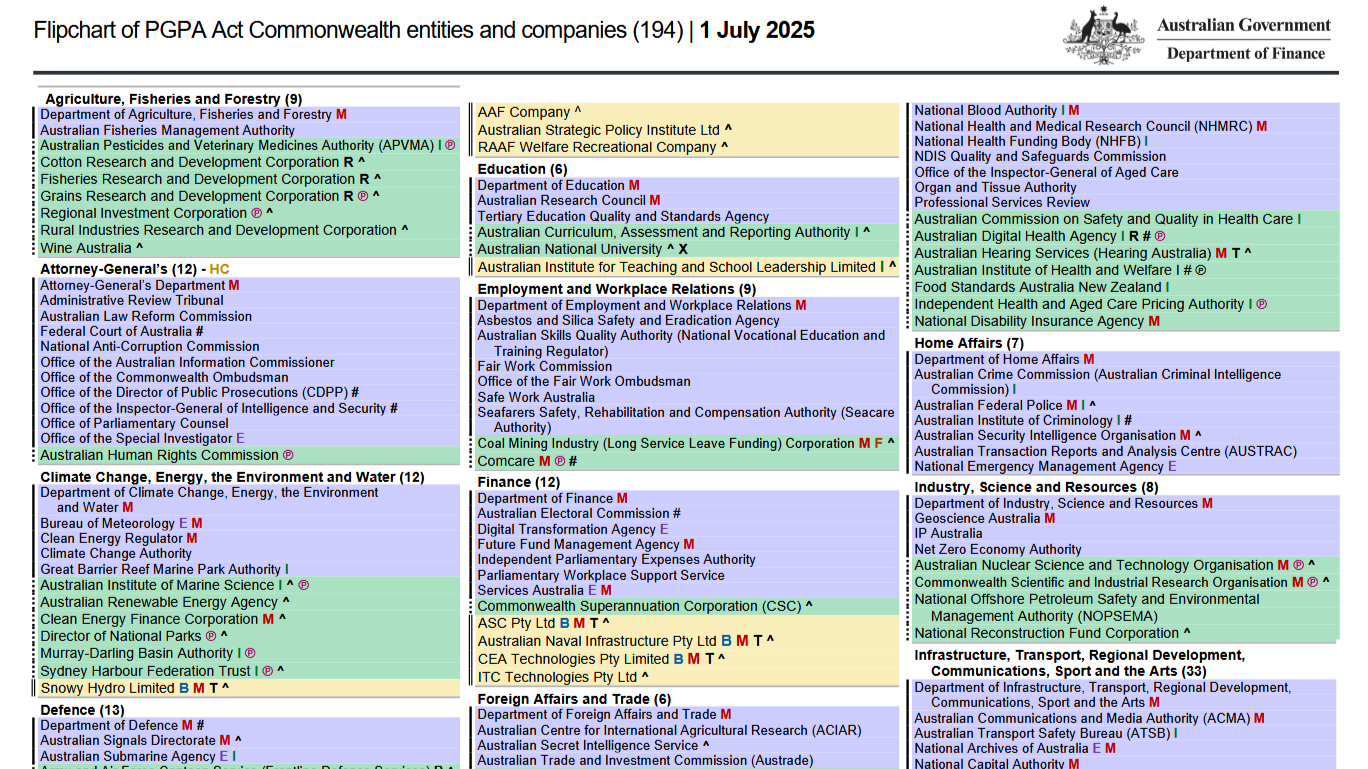
The delineation is straightforward: a Non-corporate Commonwealth entity is not a body corporate, a Corporate Commonwealth entity is a body corporate, and a Commonwealth company is a Corporations Act 2001 company controlled by the Commonwealth.
A body corporate turns out to be.
A legal entity, other than a body politic or a natural person. It includes a statutory corporation, a company and an incorporated association.
A full list of entities included in the report are published by the government. It is worth reading to understand what the data is based on.
Where the metrics come from
Much of the report ties to the Protective Security Policy Framework (PSPF), which sets out what Australian government entities should do. This article references the 22-23 PSPF as used when the Commonwealth report was written.
From the PSPF there are a couple of references in relation to cyber security, namely, policy 10 and 11.
Which translate to "Implement the Essential Eight" and "Have a look at the broader ISM".
And without wanting to write a blog that would take a week to write, lets focus in on the statistics surrounding the Essential Eight.
Essential Eight maturity at a glance
A quick glance might suggest entities went backwards, but between audits the Essential Eight controls shifted, making maturity level two harder to achieve and year-on-year comparisons trickier.
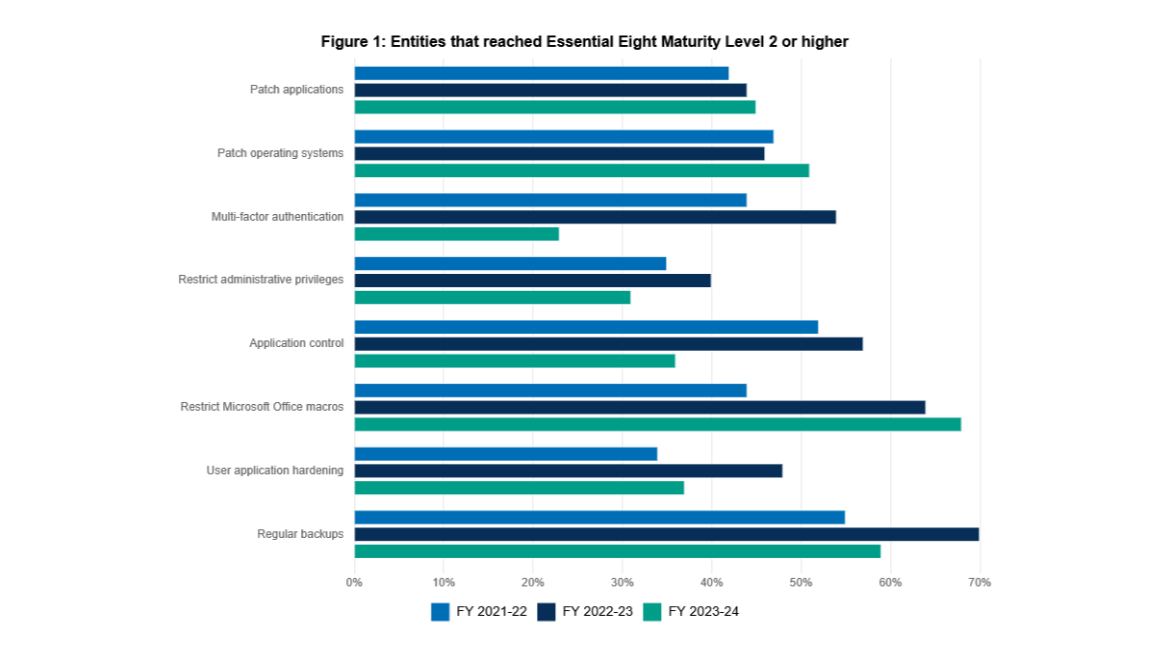
Controls that became harder to achieve included Multi-factor Authentication, Restrict Administrative Privileges, Application Control, User Application Hardening, and Regular Backups. That is more than half of the eight.
Looking at the changes, it is easy to see the baseline security was dialled up. Here is what moved and why it altered the data.
Multi-factor Authentication
A standout change is the shift toward phishing-resistant MFA for both online and local systems, which can be tedious to roll out.
We often see Passkeys like YubiKeys introduced while older, weaker MFA methods remain “as a backup.”

Restrict Administrative Privileges
A little governance with a minor headache.
It is not a glowing review of the changes, but it clarifies why entities compliant before may no longer be.
Namely, Privileged accounts explicitly authorised to access online services are strictly limited to only what is required for users and services to undertake their duties.
Implementation can be annoying even at maturity level one. Maturity level two adds management of break-glass accounts alongside local administrator and service accounts.
Application Control
Changes include annual validation of rulesets and Microsoft's recommended application blocklist.
Depending on setup, you either build a software inventory and approve from it, or allow anything that ran in a period.
The inventory path is usually simpler.
Tools like Airlock can make that efficient, and you may not need to know what Microsoft's recommended blocklist is when the Airlock has a checkbox for it.
User Application Hardening
This is an auditor favourite, and implementation can be simple or complicated: allow all browsers or pick one.
Each major browser vendor the ASD considered has its own hardening ideas, so you must consult both and use the stricter option when they conflict, even when settings like DefaultFileSystemReadGuardSetting are opaque.
And even from Google Chrome's docs, I'm still squinting at the screen trying to figure out what the setting does.
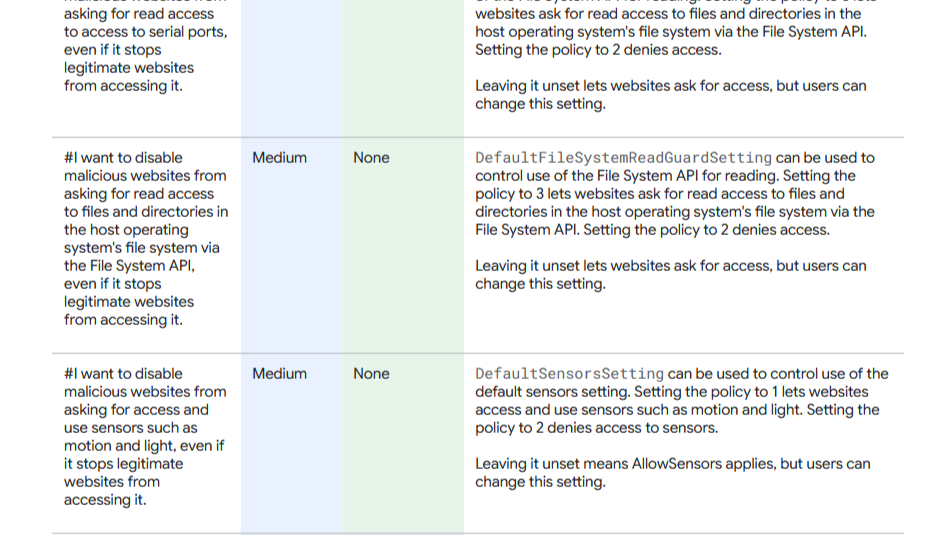
It is extra effort, but still lighter than explaining every under-the-hood change to users by email.
Regular Backups
It slipped 11% from previous years after the addition that backups must align with business criticality and business continuity requirements,
Now that doesn't directly say if those entities don't have a continuity plan period or if the backups are difficult to align to it.
Looking ahead
We will wait until November to see how Australian entities are tracking, and hopefully they are all moving in a positive direction.